
Experiments
An Experiment is a single problem you’re trying to solve.
An experiment contains stacks - collaborative workspaces built of layers of images - as well as uploads - original image files to add to Stacks.
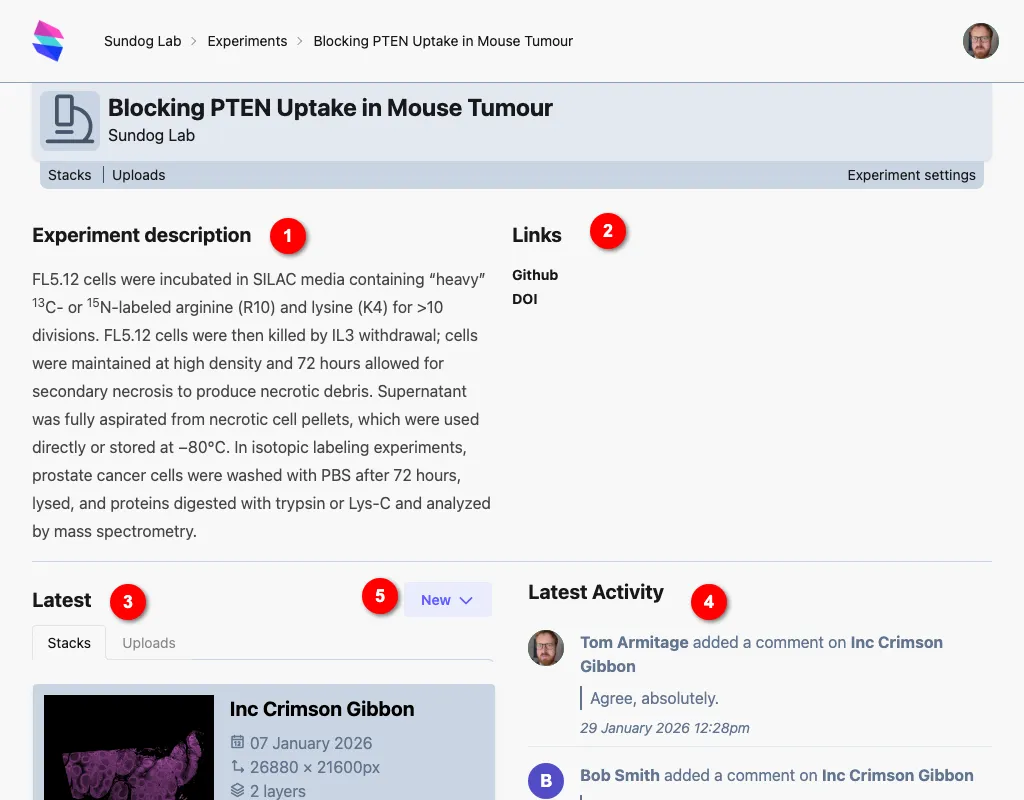
The experiment homepage shows:
- A description of the experiment.
- Any other links - for instance, to Github repos, or papers, or internal webpages about the experiment. (Both URL and Title are set from the Experiment Settings page)
- Lists of the most recent Stacks and Uploads
- A list of the most recent activity.
- The “new” shortcut menu, from which you can quickly create new stacks or uploads.
The experiment menu
Section titled “The experiment menu”Experiment-related pages all share a header describing that experiment, with the experiment menu at the bottom.

From here, you can go straight to uploads/stacks for the experiment. If you have the rights to edit the experiment (because you made it, or because you are a lab admin), you can also edit its settings.
Creating experiments
Section titled “Creating experiments”Any lab member can create an experiment from the lab home page. Uploads/stacks must exist within an experiment. There’s no limit to the number of experiments a lab can have.
When you create an experiment, you can optionally choose a project to add the experiment to.